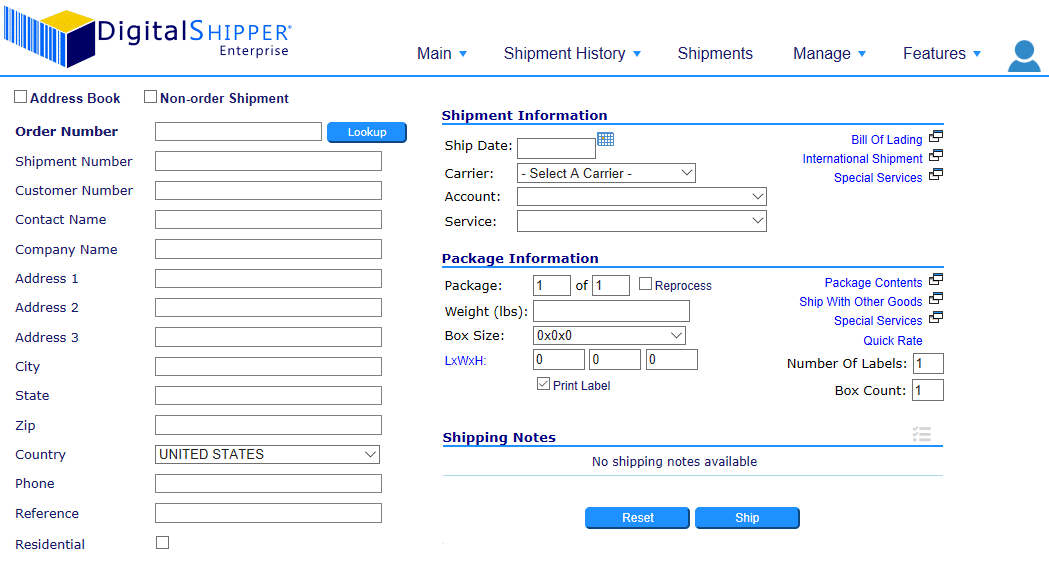

Multi-Carrier Shipping Software
Discover the #1 small parcel and LTL shipping solution for any business size, business type, and industry.

Fast Performance & Reliability

Robust Rate Shopping Capabilities

System Integration & Automation
Ship Smarter, Ship Faster
No other multi-carrier shipping software gives you powerful out-of-the-box features, the flexibility to customize based on your needs, and a seamless integration to your order and warehouse systems. DigitalShipper is ideal for companies that have a single shipping location or multiple shipping sites. DigitalShipper provides a centralized, enterprise system that can easily manage your carriers, business rules, and provide visibility for all your shipments.
Ship with UPS, FedEx, and more...
DigitalShipper includes carrier-certified compliant modules for all the major small parcel national carriers and regional carriers including UPS, FedEx, USPS, DHL, OnTrac, LSO, Spee-Dee Delivery, and more. See our complete list of compliant carriers.
One of DigitalShipper's most robust features is our standard Generic Carrier module. It is built on the same framework as DigitalShipper's Compliant Carrier modules. And gives you the ability to add your own carriers to the system including LTL freight carriers, local couriers, international freight forwarders, internal company-owned trucks, and will call. Read more about our Generic Carrier module >

Solving Problems is What We Do
When you purchase DigitalShipper, you get the team of professionals behind the technology. We solve problems every day. From adding customizations for a specific customer to adding new features that will benefit the DigitalShipper community. Our software is technology-driven and customer-focused.
Key Features

RATE SHOPPING
Maximize savings and time by using DigitalShipper’s robust rate shopping engine and attributes. Compare carriers and services based on cost, transit time, business rules, carrier cut-offs, package and delivery fees.

LTL SHIPMENTS
Ship your LTL orders with ease using the built-in capabilities in DigitalShipper for rating (cubic, FAK, single or multiple freight class), pro number generation, Bill of Lading printing, and shipment consolidation.

HAZMAT SHIPPING
Your shippers can quickly and accurately process Dangerous Goods and Hazmat shipments using the built-in item table and generate carrier Shipping Papers, Shipper's Declaration and Certification Manifests.

INTERNATIONAL
DigitalShipper delivers a simplified workflow for international shipping. Using default values for static information and flowing order data from your host system can make international shipments as easy as domestic ones.

NEGOTIATED RATES
DigitalShipper's import utility gives you the ability to load your own negotiated rates commonly used for rate shopping or calculating freight charges for invoicing. Additionally, you can manage your accessorial negotiated rates, too.

BILLING OPTIONS
When your customer wants you to bill the freight charges to their carrier account or a third party account, DigitalShipper can apply the correct billing information efficiently and accurately to avoid invoicing mistakes.

ORDER CONSOLIDATION
Ship multiple orders in the same shipment with ease and sync the data back to your order system for all the orders. The master order receives the tracking number and freight charges and all child orders receive the tracking information.

PREFERENCES
Let DigitalShipper store and automate your fulfillment or customer's preferences. Such as preferred carrier and service, return address on the shipping label, billing options account number and billing address.
System Integration
Connecting DigitalShipper to your ERP, OMS, WMS, or eCommerce system is the core of our business and part of every project. Since no two businesses are alike, we know implementing the right multi-carrier shipping solution requires our in-depth knowledge and expertise. It is what we do all day, every day.
Learn more about the integrations we connect to >

Powered by DigitalShipper
DigitalShipper is enterprise software at an affordable price. Whether you ship 50 or 50,000+ packages per day, DigitalShipper is an ideal multi-carrier shipping solution to meet your current, growing and changing needs. Our customers come from all different business sectors and industries - pharmacy, healthcare, industrial, hardware, electronics, automotive, aerospace, packaging, building materials, chemicals, textiles, consumer goods, food/beverage, and many more.
DigitalShipper is scalable and has helped many customers expand from a single shipping location to multiple distribution facilities. With unbeatable performance, DigitalShipper will keep pace shipping millions of packages per day from thousands of locations on a single deployment. Get the power of DigitalShipper working for you.
Best-In-Class Support
When you have a support question or issue, we are here to help. Your phone call to us results in a customer service person answering – no automated prompts or voice messaging systems. We understand the importance of shipping to your business and we want to respond to your needs as quickly as possible.
Get a Free Demo Today
Let us walk you through the DigitalShipper features that are important to you and discuss your integration and specific shipping needs. Businesses just like yours chose DigitalShipper to increase productivity, lower freight costs, eliminate manual processes, reduce errors, and improve controls.
DigitalShipper offers a browser-based shipping application for your shippers to process shipments with ease through our simple workflow regardless of carrier. Extend shipping functionality to other applications within your organization using our Web Services API. Contact us today to schedule a live one-on-one demonstration of DigitalShipper, the #1 multi-carrier shipping solution in the marketplace.